

【Latest Version】
Version 1.3.0.0 (Updated on October 1, 2026)
■ About Compatibility with Output Sound, etc., of Previous Project Files
This update includes several changes related to the output sound, such as updates to the voice libraries. If you apply this update, the resulting audio will differ from what was created with previous project files. If you have projects currently in production, we kindly ask that you refrain from applying this update. For specific details on the changes, please refer to the respective sections in [Updates in This Version].
Additionally, in this version, when loading a project file (.ppsf) created in v1.2.2.2 or earlier for the first time, a data conversion process to the latest format will be performed. Please note that the conversion may take longer than usual.
【Updates in This Version】
■ New Features
- Added the ability to edit portamento directly on the piano roll.
- With this feature addition, portamento can now be edited even on tracks where “Automatic Control” is enabled.
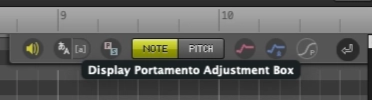
- When “Show Portamento Adjustment Box”, added to the toolbar on the piano roll, is turned on, a box-shaped UI will be displayed over the portamento range if there is editable portamento.
- You can edit it by dragging the box left or right with the “Selection Tool”.
- Drag the edges to change the length, and drag the inside to change the position.
- From the context menu on the box, you can reset edits or change to a stepped pitch line.
- Long-pressing the stepped portamento box with the mouse turns the cursor into a hand icon, allowing you to drag and move it.
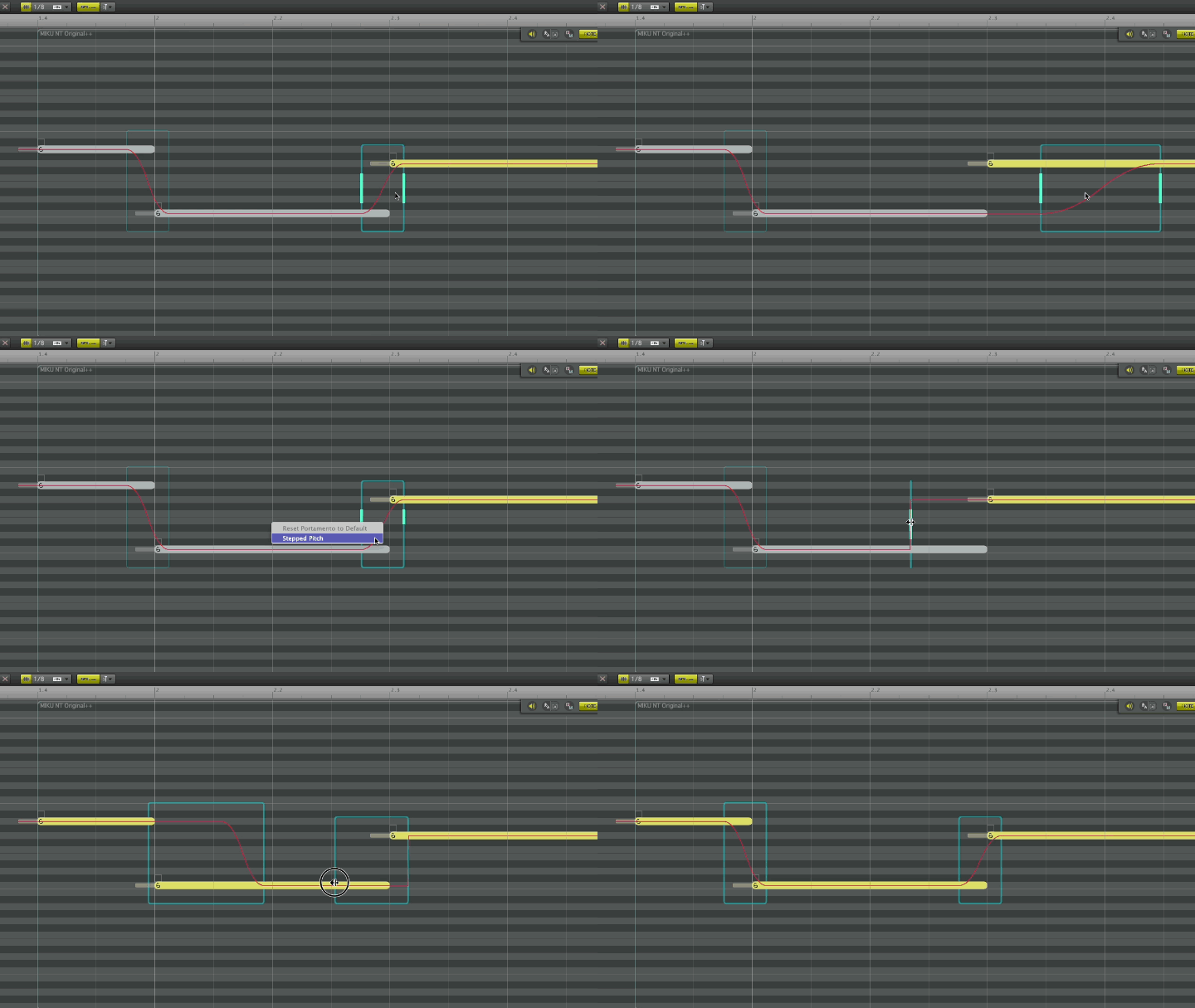
- Long-pressing the stepped portamento box with the mouse turns the cursor into a hand icon, allowing you to drag and move it.
- Added an option to change the behavior of “Pause” to the same behavior as “Stop”.
- Settings can be configured from “Menu > Transport > Pause Behavior”, or from the context menu on the “Play Button”.
- Added a rendering result caching function.
- By retaining the synthesized waveform data on the PC for a certain period, it reduces the load when loading a saved project file again.
- Settings can be configured from “Preferences… > Detail > System > Rendering Cache”.
- Please note that when using this feature, it will consume your PC’s storage according to your settings.
■ Changes
[Important] Changes related to output sound
- Voice library updates: We have updated each voice library, including noise improvements. Details can be found in the HATSUNE MIKU NT Update Information and Changelog, and KAGAMINE RIN/LEN NT Update Information and Changelog.
- Changes in pitch line shapes of past projects: Due to portamento-related specification changes, the pitch line shape may differ slightly from before when loading project files created in previous versions.
- Improvement of Super Formant Shifter: Accelerated rendering and improved synthesis quality when in use.
- Improvement of Note Gain: Improved behavior in vowels when in use.
* Due to the four changes mentioned above, the output sound may change when loading project files from v1.2.2.2 or earlier. Thank you for your understanding.
[Important] Changes related to portamento editing
- Removed portamento-related items from the “Note Setting” panel: This is due to the feature additions and specification changes mentioned above. From now on, you can edit directly from the box on the piano roll.
- Relaxed restrictions when editing portamento on tracks where “Automatically Estimate” is turned off.
Other Changes
- Improved behavior so that the playback bar returns to the last specified position during the playback “Stop” operation.
- Changed behavior so that the sample sound plays even when transposing notes.
- Updated the notation for mouse wheel settings to include Fender Studio Pro in the Studio One operation type.
- Changed behavior to display a notification if an currently unusable voice library is set when loading a project file.
- Changed behavior to display a warning prompting unification to either mode if there is a track where pitch curve “Automatically Estimate” mode and “Manual” mode are mixed when loading a project file saved in a past version.
■ Bug Fixes
- Fixed an issue that caused a crash when saving exactly when an auto-backup is being performed.
- Fixed an issue where crashes were likely to occur at random times during editing when used on “Logic Pro” or “GarageBand”.
- Fixed an issue on “Logic Pro and GarageBand” launched in Native mode, where clicking outside the window under specific conditions while some editing windows were displayed would prevent subsequent operations from being accepted.
- Fixed an issue in the vibrato editing box for Vibrato Freq where, after changing the horizontal bar value, writing a point sequence, setting “Vibrato: Manually Off”, and then undoing, the written point sequence would disappear.
- Fixed an issue on tracks with Automatically Estimate turned off, where undoing after a specific operation caused a contradiction with the previous portamento state.
- Fixed an issue that caused a crash upon confirming input when entering notes via MIDI from before the 1st measure during the host DAW’s pre-roll.
- Fixed an issue where auto-scroll might not work correctly (the display range does not return to the playback position) when playback is “Stopped”.
- Fixed an issue where the Glue Tool could be operated during the voice library loading process.
- Fixed an issue that caused a crash when Shift-dragging a selected vibrato bar.
- Fixed other minor bugs.
Please refer to the information provided on the following support page, download the latest installer, and install it.
If you are using Piapro Studio NT2 version 1.0.0.2 or later, you can also perform the update from Piapro Studio NT2’s [Help] menu > [Check for Updates…].
<Note>
Rosetta mode is not strictly required to launch the current version of Piapro Studio NT2 on Apple Silicon Macs. However, when using Logic Pro or GarageBand launched in Native mode, several limitations and issues have been confirmed. You can check the details here.
When using the applicable DAWs, we recommend launching the host DAW application in Rosetta mode by referring here.
■ Archives
v1.2.2.2 (July 14, 2026)
■ About Loading Previous Project Files (Reminder)
In this version, when loading a project file (.ppsf) created in v1.2.1.0 or earlier for the first time, a data conversion process to the latest format will be performed. This is due to internal processing updates accompanying improvements in vibrato-related operations. Please note that the conversion may take longer than usual.
Due to the improvements in vibrato-related operations, the vibrato parts may change slightly when loading previous project files.
■ About SmartScreen Warning in Windows (Reminder)
In some Windows environments, a “Windows protected your PC” warning from Microsoft Defender SmartScreen may appear when executing this update or launching the application for the first time.
This is a temporary occurrence due to the update of the application’s digital certificate. Please click “More info” on the screen and select “Run anyway” to proceed.
【Updates in This Version】
■ Bug Fixes
- Piapro Studio NT2 freezes on startup.
- The authorization screen cannot be displayed.
v1.2.2.1 (June 25, 2026)
■ About Loading Previous Project Files (Reminder)
In this version, when loading a project file (.ppsf) created in v1.2.1.0 or earlier for the first time, a data conversion process to the latest format will be performed. This is due to internal processing updates accompanying improvements in vibrato-related operations. Please note that the conversion may take longer than usual.
Due to the improvements in vibrato-related operations, the vibrato parts may change slightly when loading previous project files.
■ About SmartScreen Warning in Windows (Reminder)
In some Windows environments, a “Windows protected your PC” warning from Microsoft Defender SmartScreen may appear when executing this update or launching the application for the first time.
This is a temporary occurrence due to the update of the application’s digital certificate. Please click “More info” on the screen and select “Run anyway” to proceed.
【Updates in This Version】
■ Changes
- [Important (Reminder)] About changes in pitch line shapes of past projects: Due to vibrato-related specification changes and bug fixes in version 1.2.2.0, the pitch line shape of vibrato parts may differ from before when loading project files created in previous versions.
- Adjusted the behavior so that drawing operations for pitch lines are no longer affected by the snap function (snap will always be off).
- Adjusted the behavior in the standalone version so that changes to the master volume do not affect the volume when exporting audio.
■ Bug Fixes
- Fixed an issue where the pitch lines drawn around the affected area would become corrupted if a region containing auto-connected notes was saved in a muted state and then unmuted after reloading the project file (.ppsf).
- Fixed an issue that caused a crash when selecting a range across multiple automation tracks using the Selection Tool.
- Fixed other minor bugs.
v1.2.2.0 (June 11, 2026)
■ About Loading Previous Project Files
In this version, when loading a project file (.ppsf) created in v1.2.1.0 or earlier for the first time, a data conversion process to the latest format will be performed. This is due to internal processing updates accompanying improvements in vibrato-related operations. Please note that the conversion may take longer than usual.
Due to the improvements in vibrato-related operations, the vibrato parts may change slightly when loading previous project files.
■ About SmartScreen Warning in Windows
In some Windows environments, a “Windows protected your PC” warning from Microsoft Defender SmartScreen may appear when executing this update or launching the application for the first time.
This is a temporary occurrence due to the update of the application’s digital certificate. Please click “More info” on the screen and select “Run anyway” to proceed.
【Updates in This Version】
■ New Features
- Added real-time MIDI input function. Real-time MIDI input is now possible for NT tracks with the piano roll screen open. Please specify the MIDI input device to be used from the “Preferences” panel.
- Added quantize function. It automatically corrects the timing of selected notes. Execution settings can be configured from “Menu > Note > Quantize Settings”.
■ Changes
- Adjusted the behavior so that when the vibrato type is changed, the automatically estimated vibrato length fluctuates appropriately according to the type.
- [Important] About changes in pitch line shapes of past projects: Due to the above specification changes and vibrato-related bug fixes described below, the pitch line shape of vibrato parts may differ from before when loading project files created in previous versions.
- Adjusted the behavior so that when an edited vibrato is returned to the “Automatically Estimate” state, the “Depth” and “Rate” values return to the auto-estimated values.
- Adjusted the behavior so that when the phoneme input field is confirmed while empty, it automatically resets to the default phoneme setting corresponding to the entered lyrics.
- Adjusted the behavior so that triplet settings are reflected in the grid display even when the snap function is turned off.
- Set an upper limit for the maximum song length of a project (4,000 measures for 4/4 time signature). If you open a project file (.ppsf) that already exceeds this limit, the original song length will be maintained.
■ Bug Fixes
- Fixed an issue where disabling the plug-in under certain conditions in Ableton Live (VST version) and Bitwig Studio caused continuous re-rendering, making operation difficult.
- Fixed an issue where performing certain operations during the voice library loading process immediately after startup caused the application to freeze or crash.
- Fixed an issue that caused a crash when exiting Piapro Studio NT2 after deleting a region with a specific procedure.
- Fixed an issue where the vibrato was reflected in a shape different from the specified vibrato length when “Vibrato: Manually On” was selected and the vibrato type included “Release+”.
- Fixed an issue where the “Depth” and “Rate” values previously set in the “Note Setting” panel were not reflected in the pitch line shape when vibrato was newly added from a state without vibrato.
- Fixed an issue where settings in the track’s “Automatic Control” were not correctly applied to the “Depth” and “Blend” of vibrato in newly created notes.
- Fixed an issue where when drawing vibrato using the “Line Tool” on an automation track across multiple boxes, the written content was not reflected in some boxes depending on the operation procedure.
- Fixed an issue where the pitch curve display might not match the actual playback sound after deleting a drawn pitch curve and removing vibrato from that range.
- Fixed an issue where clicking the slider in the “Note Setting” panel did not change the value for some items while multiple notes with different parameter values were selected.
- Fixed an issue where the original consonant length was not restored correctly when undoing the creation of a new note at a position that interfered with a manually set consonant length.
- Fixed an issue in the Windows environment where some shortcut keys stopped working after performing specific operations until the Enter key was pressed once.
- Fixed other minor bugs.
v1.2.1.0 (March 17, 2026)
■ New Features
- Added parameters to control vibrato “Depth” and “Rate” via automation.
- Added support for operation on DAWs running in Native mode on Apple Silicon Macs.
* When using Logic Pro or GarageBand, we continue to recommend launching in Rosetta mode.
■ Changes
- Changed the specification to place some restrictions on the move operation when dragging the body of the editor window, in order to prevent unintended behavior.
- Changed the behavior in the overwrite confirmation dialog during audio export so that pressing the Enter key is processed as “Save As”.
■ Bug Fixes
- Fixed an issue where the application would crash when quitting or opening another .ppsf file after deleting an audio track.
- Fixed an issue where previously copied markers would be pasted simultaneously when executing a marker copy and paste.
- Fixed an issue where vibrato would be unintentionally re-estimated if a .ppsf file saved with a note’s vibrato set to “None (Manual)” was loaded and the phrase containing that note was edited.
- Fixed an issue in the overwrite confirmation dialog during audio export where pressing the Esc key did not cancel the operation and resulted in overwriting the file.
- Fixed an issue where a warning dialog was not displayed during audio export if the file name or destination path was too long.
- Fixed other minor bugs.
*Due to updates introduced in version 1.0.2.0, when opening project files created with version 1.0.1.2 or earlier for the first time, a “conversion to the latest format” process will occur, which may take longer than usual. Thank you for your understanding.
v1.2.0.0 (January 21, 2026)
■ New Features
- Added a feature to export selected tracks individually during audio file export.
- Added the Glue Tool. This allows you to join adjacent or multiple selected regions or notes into one.
- Added parameters to adjust vibrato “Depth” and “Rate”.
- Added a feature to switch the automation curve scale in the Dynamics track between “%” and “dB”. The shape of the displayed curve changes upon switching, but the actual output volume is not affected.
- Added a feature to notify the host DAW when changes are made in the plug-in version of Piapro Studio NT2. This is reflected in the unsaved warning when closing the project.
※For Ableton Live on macOS, this is supported in the VST version only.
■ Changes
- Reduced memory usage.
- Optimized the layout and items of the “Vibrato” tab in the Note Settings Panel due to the expansion of vibrato functions.
- Improved behavior so that clicking with the Eraser Tool can now delete selected written pitch lines.
- Changed the default setting at first launch so that the pitch line display in Note Edit Mode is set to “On”.
■ Bug Fixes
- Fixed an issue where a crash could occur when modifying tempo events sequentially from the end of the song towards the beginning.
- Fixed an issue in the macOS standalone version where using menus or shortcut keys would cause a crash when the editor was hidden (e.g., minimized).
- Fixed an issue where cancelling audio device settings changes did not work correctly.
- Fixed an issue where deleting automation events in a rest section using specific steps was not reflected in the actual playback sound, resulting in the parameters before deletion still being applied.
- Fixed an issue where a crash would occur when editing a phrase containing a note after an “empty move” (an operation resulting in no actual movement) was performed on that note.
- Fixed an issue where a crash would occur when changing a note connected by a consonant to a subsequent note to “Sil”.
- Fixed an issue where a crash would occur when performing operations such as reverting to normal lyrics after changing a note with manually applied vibrato to a consonant-only phoneme.
- Fixed other minor bugs.
*Due to updates introduced in version 1.0.2.0, when opening project files created with version 1.0.1.2 or earlier for the first time, a “conversion to the latest format” process will occur, which may take longer than usual. Thank you for your understanding.
v1.1.3.0 (December 17th, 2025)
■ Changes
- [Windows] Improved keyboard shortcuts to function correctly even when the IME is in “Full-width (Zenkaku)” input mode.
- Optimized background rendering processes to prioritize the current playback position when loading files or using the plug-in version.
- Removed “32 bit (int)” from the Audio Export settings, as this format is not supported.
■ Bug Fixes
- Fixed an issue where the application would rarely crash during Audio Export.
- Fixed an issue with saved .ppsf files where editing a phrase following a “cl” note could cause a crash.
- Fixed an issue where the application would crash during time signature manipulation after consecutively importing .vsqx files that contain different time signature changes.
- Fixed an issue where manual vibrato was not applied to specific notes when “n” (ん) lyrics occurred consecutively.
- [Windows] Fixed incorrect behavior when the Scroll Setting was set to “Ableton Live type”.
- [macOS] Fixed incorrect behavior when the Scroll Setting was set to “Bitwig Studio type”.
- Fixed an issue where sample sounds might not play depending on the Master Tempo settings.
- Fixed an issue where deleting a track would not take effect while the Piano Roll was open.
- Fixed other minor issues.
*Due to updates introduced in version 1.0.2.0, when opening project files created with version 1.0.1.2 or earlier for the first time, a “conversion to the latest format” process will occur, which may take longer than usual. Thank you for your understanding.
v1.1.2.0 (November 19th, 2025)
■ New Features
- Added support for importing VOCALOID5 / 6 project files (.vpr).
■ Changes
- Organized the items related to VOCALOID3 / 4 data import within “Preferences…” to match current specifications.
- Moved the “Max interval for notes to connect automatically” setting to the “Preferences… > NT Engine > Basic” tab.
- Changed specifications so that disabled notes are excluded from input when entering lyrics sequentially.
- In the waveform display track at the bottom of the piano roll, adjusted and widened the mouse-hit area for changing consonant length to make it easier to grab.
■ Bug Fixes
- Fixed an issue where Vocal Morphing would be automatically disabled after loading a .ppsf file if the current voice library version differed from the version used when the .ppsf file was saved.
- Fixed an issue in the plug-in version where playback from a midway point in the host application caused rendering errors if the host’s tempo setting differed from Piapro Studio’s tempo setting.
- Fixed a crash that occurred when loading a .ppsf file including notes that did not belong to any region.
- Fixed an issue in the VOCALOID3 / 4 data import settings where Velocity conversion was not functioning correctly.
- Fixed an issue where the Master Meter information display was not updated after importing files such as MIDI.
- Fixed an issue when exporting MIDI files where the Master Meter value was not correctly reflected in the time signature information at the beginning of the song if the song contained time signature changes.
- Fixed other minor bugs.
*Due to updates introduced in version 1.0.2.0, when opening project files created with version 1.0.1.2 or earlier for the first time, a “conversion to the latest format” process will occur, which may take longer than usual. Thank you for your understanding.
*During this automatic update, once the Piapro Studio NT2 update is complete, a follow-up re-update process for the voice library will begin. Please follow the on-screen instructions to update the library accordingly.
v1.1.1.0 (November 5th, 2025)
■ New Features
- Added the functionality to double-click the Tempo/Time Signature track to close it.
- Track names now automatically update when the singer is changed.
- Adjusted the pitch-shifting engine to improve audio continuity when switching between multi-samples with pitch differences.
- Added support for horizontal scrolling using tilt wheel-equipped mice, improving navigation within the editing screen.
■ Bug Fixes
- Fixed an issue where the software would freeze if switching to another voice library during the loading of a voice library.
- Fixed an issue where changes to the Vocal Morphing value during playback were not reflected in the sound of unrendered sections.
- Fixed an issue where, when background rendering was turned OFF, changes to Vocal Morphing values were not reflected in the playback audio.
- Fixed an issue where consonant length display and editing behavior became incorrect in files containing tempo changes.
- Fixed other minor bugs.
v1.1.0.0 (October 15th, 2025)
■ New Features
- Added support for the “KAGAMINE RIN/LEN NT” voice library.
- Implemented the “Vocal Morphing” feature — a parameter that enables intermediate expressions by selecting different libraries within the same singer.
■ Bug Fixes
- Fixed a known issue where, in projects imported from VSQ or VSQX files, an “empty region” could occasionally be created. Also fixed an issue where PPSF files containing empty regions could not be opened in version 1.0.2.0 or later.
- Fixed an issue where newly created notes on tracks with “Auto Estimation Off” were incorrectly set to “Auto Estimation On.”
- Fixed an issue where noise could occur at the end of sample sounds during playback.
- Other minor fixes and improvements.
The development team will continue to provide updates, add new features, and make improvements.
Thank you for your continued support.


