1小節目からテンポ情報が書き込まれている最後の小節まで、ノートを入力したリージョンを用意します。 ※入力するノートは、1音だけでもOKです。 用意したリージョンを選択して、MIDIファイルに書き出します。 ・ファイル […]
Read more »ファイル → 書き出し → MIDIファイルを選択し、適当な場所にMIDIファイルを書き出します。 ※書き出しオプションが表示されますが、そのままOKで問題ありません。 書き出されたMIDIファイルを、Piapro St […]
Read more »ファイル → 名前を付けて保存を選択し、保存ダイアログを表示します。 ファイルの種類を「MIDIファイルフォーマット」に変更し、適当な場所に保存します。 ※フォーマット0とフォーマット1がありますが、どちらでも構いません […]
Read more »At times, you will want to be able to modify the pronunciation of words sung, into a tuning you desire or pref […]
Read more »When you replace “Impact”(bandles with Studio One) with “Presence”(bandles with Studio […]
Read more »When you click the “advanced settings” in the lyric entering pallet, you can execute various setti […]
Read more »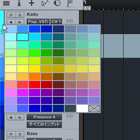
When you click the left side of the track, the color pallet appears. When you have many tracks, it will be eas […]
Read more »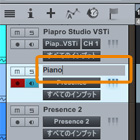
When you double click the displayed instrument name(Piapro Studio VSTi or Mutant VSTi、Presence etc.), you can […]
Read more »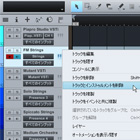
Right clicking the track displays the menu(picture below). When you delete both track and instrument, click &# […]
Read more »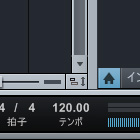
You can change the tempo of the whole song with [Tempo] at the lower right of Studio One screen. When the temp […]
Read more »

